
The promise of Virtual Monitoring PRO has always been fidelity: capture your room, your speakers, your ears, and carry that acoustic fingerprint into any session. Everything about how that process works is covered in our previous article.
But fidelity cuts both ways.
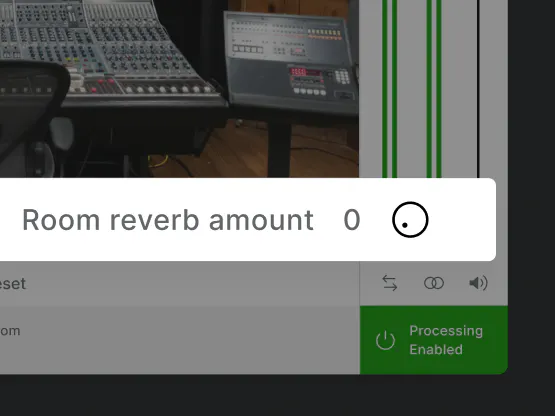
Capture a great room, and it travels with you. Capture a room that’s too reflective, and those reflections travel with you, too. The new Virtual Monitoring PRO Room Reverb Amount control addresses this, allowing you to shape your captured studio’s reverb without remeasuring from scratch.
Why Reverb in Your Monitoring Room Matters More Than You Think
Every room has a reverberation time — the duration it takes for sound to decay after its source stops. Acousticians measure this as RT60: specifically, the time for sound pressure to drop by 60 dB. A cathedral might hold 8–10 seconds of RT60. A well-treated recording studio typically targets 0.3–0.5 seconds. An untreated bedroom can sit anywhere in between.
For mixing engineers, RT60 is everything. Too much reverb in your monitoring environment and the reflections mask what’s actually in your mix. Low-end builds up, transient detail blurs, and you start making decisions based on room behavior rather than audio truth. This is why engineers like Dana Nielsen, who has mixed for SZA, The Avett Brothers, Smashing Pumpkins, Santana, Neil Diamond from his bedroom studio, describe walking into an unfamiliar room and immediately clocking its acoustic problems just from the sound of their own footsteps.
When you capture a room in Virtual Monitoring PRO, you capture everything: the spatial image, the tonal balance, the stereo depth, and the RT60. For most rooms, that’s exactly right. But not every room you’ll want to measure has been acoustically treated to mixing-studio standards.
If you want to understand how reverb behaves in a mix, as opposed to in your monitoring room, see our guides on using reverb effectively when mixing on headphones and creating ambience and depth with reverberation. Those are mix decisions. What Virtual Monitoring PRO room reverb control manages is your monitoring environment, the room character you’re making those decisions through.
What Virtual Monitoring PRO’s Room Reverb Amount Control Does
The control lets you adjust the reverb time of your Virtual Monitoring PRO profile after capture without rebuilding the model or remeasuring.
It defaults to 100%, which equals the original room reverb, exactly as captured.
- Pull it toward 0% for a drier, tighter sound that still retains the spatial character of your room: the stereo image, depth, and sense of working in a real space remain intact
- Use it as virtual room treatment: if your captured room has too many reflections, dial back the reverb time without losing the profile you spent time building
The distinction matters. It’s adjusting the acoustic character of the monitoring environment your mix plays through, the same way acoustic panels in a physical room reduce reverb time without eliminating the spatial behavior of the space.
Who This Is For
Aaron Mattes, mix and Atmos engineer, described his core problem on the road: “I need to be able to trust what I’m hearing.” That trust breaks down the moment your monitoring environment misleads you, whether it’s an unfamiliar room at a client studio or a captured Virtual Monitoring PRO profile with more room reverb than your work demands.
Practically, this matters most in three scenarios:
Your captured room is reverberant. Home studios and untreated rooms often have RT60 values well above mixing-studio targets. You still want the spatial model, you don’t want to remeasure in a different room, but you need the reverb tamed. Now you can.
You’re switching between tasks. A longer reverb tail might suit critical listening and A/B referencing. A drier setting works better for detailed editing or close headphone checks. One profile, two working modes.
You’re working at night or away from your setup. Dana Nielsen captures this precisely in his review: headphones become useful in two ways instead of one, the raw headphone sound for checking details, and the virtual room for evaluating the mix spatially. Virtual Monitoring PRO room reverb control means you can tune that second mode to exactly the listening character you want.
For genre-specific considerations where reverb decisions in your mix itself vary significantly see our quick tips on reverb for EDM and pop.
What Else Is in This Update
This release also adds support for macOS 26, asymmetric listening spot detection, correction and controls, and measurement resume functionality. Full details on other improvements and fixes can be found in the release notes: sonarworks.com/legal/soundid-reference/release-notes
Get Virtual Monitoring PRO
Room Reverb Amount is available now in the latest version of Virtual Monitoring PRO. Haven’t captured your room yet? Learn more about the product and the improvements it can deliver to your everyday workflow.