


A well-organized session is as important to professional audio work as a well-tuned instrument. Whether you’re engineering, producing, mixing, composing, or delivering stems for post, the way you structure projects—naming, color-coding, grouping, templating, versioning, and backing up—directly impacts efficiency, collaboration, translation, and creative focus. Disorganized sessions waste time, introduce errors (wrong takes, misplaced files, mismatched sample rates), and erode confidence when projects are handed off. This article lays out a practical, workflow-driven approach to DAW session organization for modern production teams. It examines human and technical factors driving organizational choices and covers professional naming conventions, track color systems, folder and group strategies, version control and backup workflows, template design, cross-project asset management, and tips to speed up collaborative work. I would like to deeply thank all the fellow studio engineers and post professionals who shared their insights on workflow practices that informed the recommendations contained in this article.
Introduction
The complexity of contemporary audio production workflows—multiple contributors, heterogeneous plugin ecosystems, diverse delivery formats, and distributed collaboration—places a premium on predictable project structure and reliable asset control. Poor DAW session organization increases cognitive load, causes wasted time, risks data loss, and complicates handoffs. Conversely, disciplined session organization improves creative focus, reduces turnaround time, and enhances the reproducibility of technical decisions, including monitoring, metering, and translation across systems. In this article, we will frame organization as a systems problem encompassing human factors, file-system practices, DAW capabilities, and infrastructure (local and cloud storage), and present a coherent set of practices suitable for studios of varying scale.
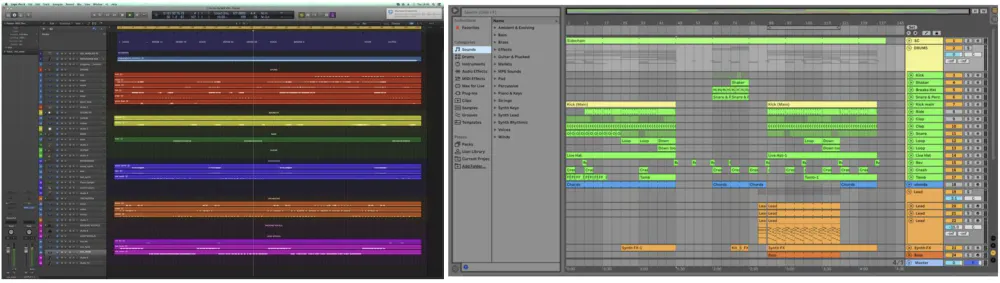
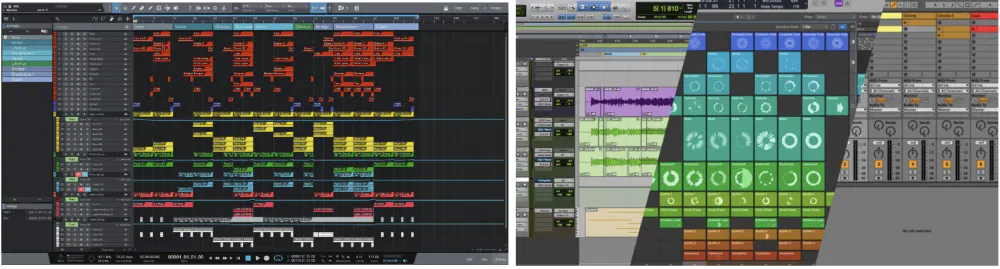
The disorganized session exhibits inconsistent naming, lack of grouping, and no color taxonomy, increasing cognitive load and error probability.
The organized session demonstrates structured naming, consistent color coding, and logical grouping, enabling faster navigation and improved decision-making.
Why DAW Session Organization Matters
- Speed: Clear structure reduces search time for files and settings, speeding mixing and revision cycles.
- Consistency: Consistent naming and layout across projects reduces cognitive load and makes switching projects faster.
- Collaboration: Producers, mix engineers, session musicians, mastering engineers, and post teams all benefit from predictable structure. (See also: How to Prepare Your Session for a Mixer — a practical guide to handoff-ready sessions.)
- Reliability: Proper versioning and backups reduce risk of data loss and mistakes (e.g., exporting the wrong file or overwriting important edits).
- Translation: Well-structured sessions make it easier to troubleshoot translation issues across playback systems by enabling quick A/Bing, bypassing plugins, or isolating stems.
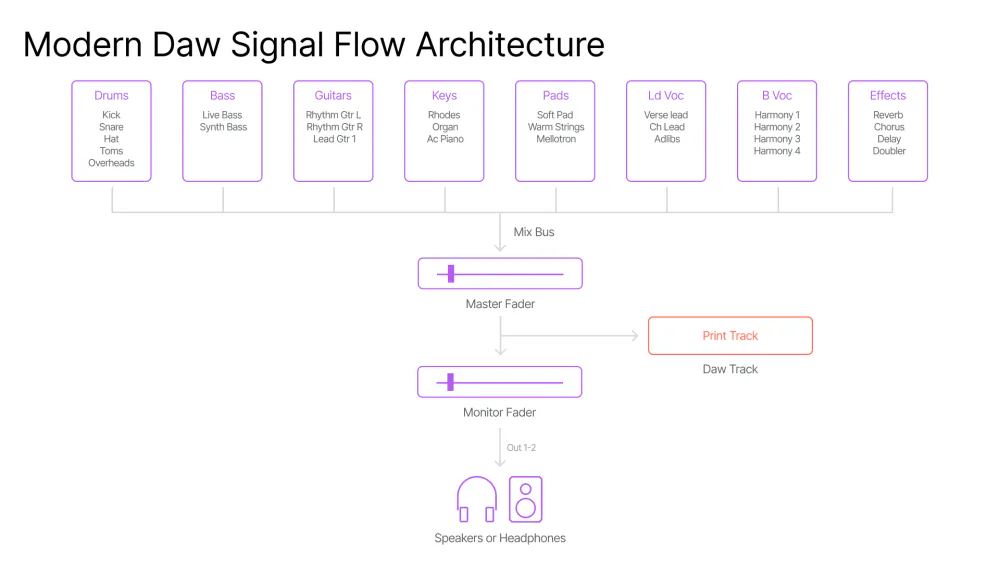
The diagram illustrates the transformation of audio from an acoustic source through capture, digitization, processing, bus routing, and final mixdown. A consistent structural organization of this signal path improves reproducibility, troubleshooting, and collaborative workflows.
Design Principles and Human Factors
Effective organizational systems follow a small set of principles:
- Concise explicitness: Names and metadata should encode the minimal necessary information to identify content and context without opening files. Good naming is precise and machine- and human-readable.
- Consistency: Uniform conventions across sessions reduce cognitive switching costs and errors.
- Non-destructive defaults: Preserve raw assets and maintain incremental versions rather than overwriting.
- Portability: Structure should survive transfers between operating systems, DAWs, and storage systems.
- Scalability: Practices must remain practical for both single-track projects and multi-reel, multi-DAW productions.
- Automation-friendly: Leverage DAW templates, scripts, and macros to reduce manual repetition.
- Time proof: As much as possible, information should be kept in a future-proof, readable format in this fast-evolving technology world.
Human factors research highlights that predictable visual and naming patterns reduce task-switching time and error rates. Although not as unforgiving as a hospital operating room or an airliner cockpit, the recording studio is still prone to error, and with simple but non-trivial best practices like color-coding, grouping, and standardized short names, we can accelerate pattern recognition within complex sessions that dramatically improve the performance of the audio production process.
File and Folder Naming Conventions
Solid DAW session organization starts with a robust naming convention. Names must be unique, machine- and human-readable, sortable, and unambiguous.
A recommended filename structure should adopt a modular, delimited convention:
YYYYMMDD_Client_Project_Part_Spec_vNN[_tag].extExample: 20260320_SmithAlbum_LeadVox_SM7B_Take03_v02.wav
The elements are:
- YYYYMMDD — ISO-like date prefix for chronological sorting.
- Client/Project — short identifier (no spaces).
- Part/Role — LeadVox, BackVox, Kick, Snare, Gtr_Rhythm_L.
- Spec — mic, take, instrument patch, or another critical descriptor.
- vNN — version number, increment for each deliberate save/export (v01, v02).
- Optional tag — “final”, “comp”, “stems”, “archive”.
- Ext — regular extension now shared among all operating systems.
Additional rules:
- Avoid spaces and special characters that may break scripts or cross-platform paths; use underscores or hyphens.
- Keep names under conservative length limits (≤ 64 characters) to avoid file-path truncation on older systems.
- Standardize capitalization (all-lowercase or TitleCase) studio-wide to reduce visual mismatch.
- Where sample rate or bit depth matters for delivery, encode it in exports: e.g.,
_48k_24b.
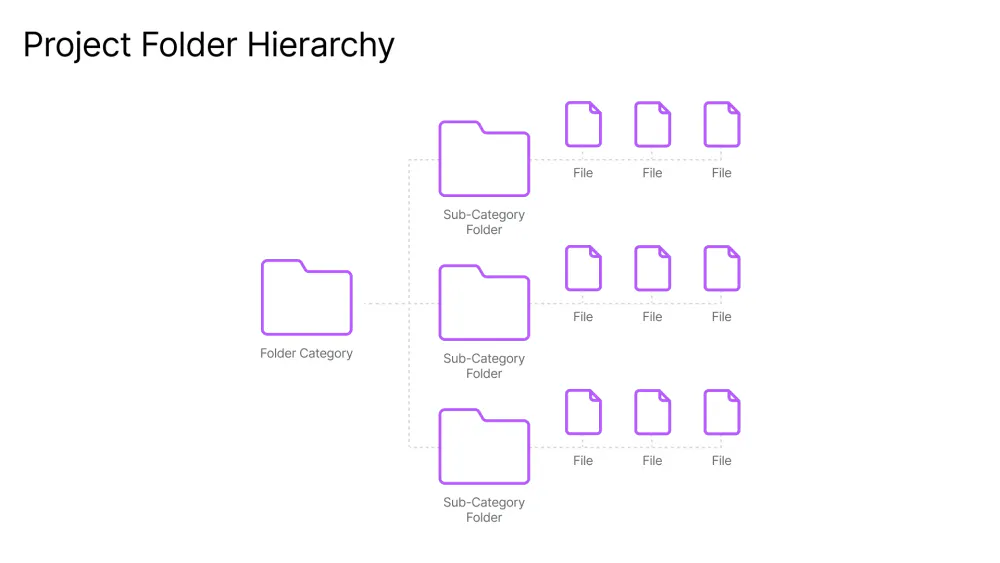
Separation between raw, edited, processed audio, stems, and final bounces ensures data integrity, simplifies handoff, and supports scalable collaboration across teams and platforms.
Session Files
Session files should follow a similar strategy, including DAW identifier and machine/location when appropriate:
20260320_SmithAlbum_v03_StudioA_ProTools.sesx
Always maintain a session_versions/ folder with timestamped copies and a short changelog (text file) describing key edits.
Track Naming, Color Coding, and Visual Layout
Track names and color schemes are the first-line interface for navigation within a DAW.
Track Naming Conventions
Use short structured names incorporating role, position, mic/patch, and take/version:
Role_Position_Mic_Version
Examples: leadvox_main_sm7b_take03 ; kick_sub ; guitar_rhythm_l_oi
Include processing status if helpful (suffixes such as _dry, _fx, _comp-v01) but avoid overloading names with transient state.
Color Coding Taxonomy
Color associates category quickly; define a limited palette assigned to functions:
- Vocals: magenta (lead), purple (backs)
- Drums: orange (kick), yellow (snare), amber (toms), light blue (OH)
- Bass: deep blue/teal
- Guitars: green variants (L/R contrast)
- Keys/Pads: cyan/teal
- FX/Aux: gray
- Buses: saturated dark (red = mixbus, forest green = drum bus)
- Status overlay: optional border or hue shift to indicate review status (green = approved, orange = needs changes, red = incomplete)
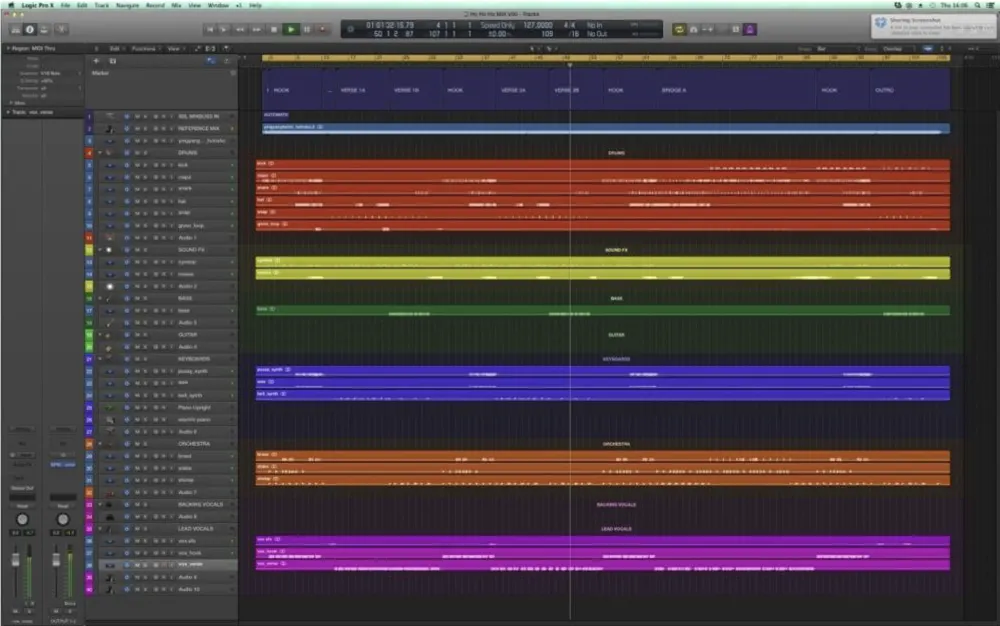
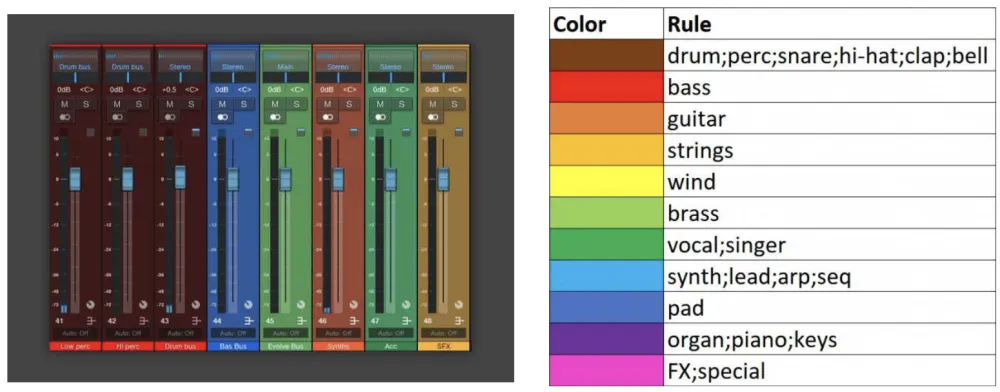
Color assignment to instrument groups (e.g., vocals, drums, bass) enhances pattern recognition, reduces search time, and supports faster navigation in complex sessions.
Visual Layout and Track Grouping
Arrange tracks left-to-right by processing and importance: drums, bass, guitars, keys, vocals, FX, buses.
Use folder tracks or track groups to collapse families and reduce screen clutter.
Place utility tracks (click, talkback, reference, mono check) consistently at a fixed end of the track list (either head or tail).
Always create labeled markers for structural navigation (Intro / Verse / Chorus / Bridge / Outro).
Folder and Bus Structure Strategies
Consistency on disk and in-session bus routing enables quick operations like stem export, bussing, and measurement.
A recommended project root structure:
ProjectRoot/
  session_files/         (session files and session_versions/)
  audio/
    raw/                 (untouched recorder files)
    edited/              (comped and consolidated files)
    processed/           (track-level rendered or printed files)
    stems/               (export-ready stems)
    bounces/             (mix bounces, revisions)
  samples/               (project-specific samples)
  presets/               (saved plugin presets)
  docs/                  (README, cue sheets, notes, licenses)
  assets/                (artwork, video references)
  archive/               (older versions and deliveries)
Rationale: Raw files are immutable references; edited/processed files are derivatives. Keeping stems and bounces in separate folders greatly simplifies handoff. Preserving plugin presets and documentation in the project accelerates reconstruction, reduces dependency on proprietary settings, and improves future compatibility.
Bus Naming and Routing
Use consistent routing order and include bus routing diagrams in docs for large projects.
Standardized bus names:
- Group buses:
BUS_DRUMS,BUS_BASS,BUS_GTR_RS,BUS_VOCALS,BUS_KEYS,BUS_FX,BUS_MIX - Aux returns:
FX_REVERB_L,FX_REVERB_S,FX_DELAY_1 - Parallel buses:
DRUMS_COMP_PAR,VOCAL_COMP_PAR
For a deep dive into serial and parallel routing configurations, see Pro Mixing: Serial and Parallel Effects — the routing logic there maps directly onto a well-organized bus structure.
Version Control, Backups, and Large-Binary Strategies
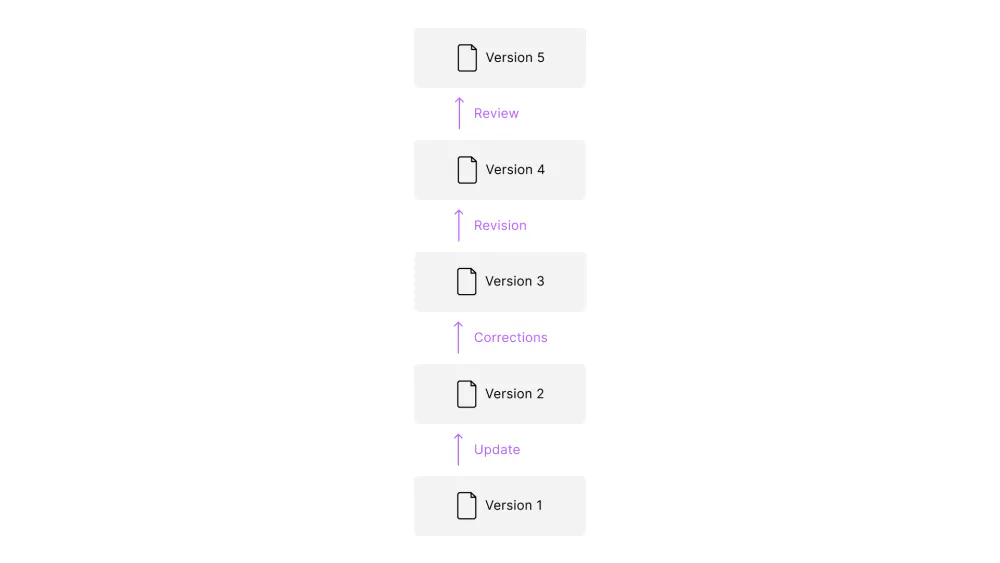
Adopt an explicit policy: save early, save often, and always do it incrementally — v001, v002…
Major milestones (tracking, comping, rough mix, final mix) get milestone tags in filenames and changelog entries.
Avoid incremental milestone naming that loses all meaning: final_mix_def_def_done_master_v4_def
Preserve autosave for crash recovery; do not substitute autosave for intentional version saves.
Backup Tiers
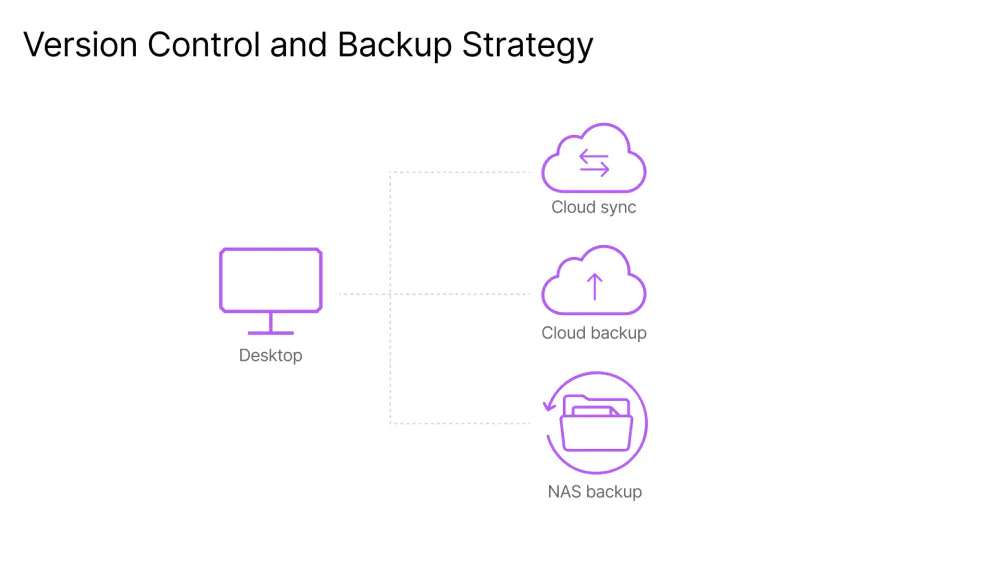
- Tier 1 — Local Working Drive: Your active session lives here. Use a dedicated SSD or RAID array for maximum read/write performance.
- Tier 2 — Local Backup: Sync nightly to a NAS with snapshot capability for fast, on-site recovery.
- Offsite and Cloud (Tier 3): Set up daily or event-triggered sync to an external cloud provider or remote server for disaster-level protection.
Backup Implementation Examples
- Rsync + cron (Linux/macOS): Efficient block-level sync to NAS.
- Commercial sync: Dropbox/Google Drive/Box with selective sync and version history.
- Enterprise: S3-compatible object storage with lifecycle policies for long-term archiving.
- Hardware imaging/snapshots: Hourly snapshots for critical servers to allow point-in-time recovery.
Managing Large Audio Assets in Version Control
Avoid storing raw WAVs in Git. Use Git-LFS, Perforce, or dedicated media asset management (MAM) systems for binary diffs and metadata tracking.
For collaborative studios, consider Perforce (Helix Core) or Plastic SCM, which handle large binaries and provide locking to prevent concurrent edits.
Maintain a lightweight text manifest (CSV/JSON) listing major audio files and their checksum (md5/sha256) to validate transfers.
Templates, Automation, and Efficiency
Good DAW session organization depends on templates you can actually rely on. Maintain multiple templates for common workflows:
- Tracking template: Armed input tracks, headphone sends, talkback, click, input channel strips with gentle HPFs. (See Optimize REAPER For Recording with Templates for a practical implementation.)
- Editing template: Lanes, comping tracks, crossfade defaults, track color and naming scheme.
- Mixing template: Buses, reference tracks, metering (LUFS, true-peak), master inserts (gain staging, optional limiter disabled). (See REAPER Mixing Templates: A Session-Changing Workflow for detailed mixing template setups.)
- Mastering/check template: High-resolution metering, dithering modules, export presets.
Templates should be conservative: do not include heavy processing chains that bias mixes prematurely. Instead, include placeholders and utility routing. If you find yourself removing the same element every time you load a template, it doesn’t belong in the template.
Automation and Macros
Leverage DAW macros and keyboard shortcuts to automate repetitive tasks: consolidate region, export stems, freeze tracks, render in place, etc.
Use file and folder templates that create the project skeleton automatically on new-session creation.
Consider simple scripting (ReaScript for REAPER, Logic/Pro Tools scripts) to import metadata and batch-rename files.
Asset Library and Cross-Project Reuse
Asset Cataloging
Build an indexed asset library with searchable metadata (CSV/SQLite/Media Asset Manager) capturing:
- Asset name, source, tempo, key, tags (genre, instrument), owner/license, date added, associated projects.
- For samples, include waveform preview and normalized loudness metadata (LUFS or RMS) to ease matching.
A large number of scripts and other resources are available in several DAW-specific community repositories. With the assistance of AI and the ease that vibe-coding provides, you can also program custom macros and scripts more readily than ever to improve workflow speed significantly. You may also want to share your own productions in those repositories.
Licensing and Traceability
Maintain a Licenses/ folder with EULAs and proof of purchase. Tag assets with license status to prevent inadvertent unlicensed reuse.
Shared Presets and Templates
Publish studio-wide preset repositories for common instruments and effects. Version-control these assets (text manifests + checksums).
How an Organization Improves Monitoring and Decision-Making
Well-structured sessions improve monitoring workflows in several technical and cognitive ways:
- Quick isolation and bypassing: Clear bus structure and naming allow fast A/B and bypass tests for critical monitoring checks (e.g., determining whether perceived harshness is from room or processing). Tools like SoundID Reference pair directly with this approach — accurate room correction is most effective when your session structure keeps the signal path clean and navigable.
- Reproducible levels and references: Templates that include calibrated reference playback channels and metering allow consistent level-based decisions (e.g., referencing LUFS targets).
- Efficient measurement workflows: Separate dry/processed routing enables rapid measurement (e.g., measuring frequency response or phase on a dry signal) without reconstructing paths.
- Faster recall: Versioned session files and documented plugin chains reduce time to re-create listening conditions for verification on multiple monitors.
Handoff, Collaboration, and Speed
Handoff Checklist
(Refer to AES TD1002.2.15-02 for the full industry standard.)
- Consolidate edited takes to single audio files where appropriate.
- Export stems: individual tracks, grouped buses, and full mix with/without master chain.
- Include project README: tempo map, key, tuning, plugin list and versions, versions map and change-log.
- Verify all audio files load in a fresh session on a reference machine.
For a full walkthrough of what a mixer expects to receive, see How to Prepare Your Session for a Mixer and How To Set Up Your Mixing Sessions Like A Pro.
Collaboration Infrastructure
- Use cloud storage with clear folder permissions and a canonical project root.
- For near-real-time remote work, use Source-Connect, Audiomovers, or DAW-specific collaboration tools (like rea-cast).
- Maintain a shared communication channel (Slack/Trello/Notion) and pin the project brief and deliverable milestones.
Speed Techniques
- Exchange a “starter pack” (consolidated rhythm and guide vocals) so mixing can begin while tracking continues.
- Use standardized stems and naming so receiving engineers can import automatically into their DAW templates.
- Adopt time-stamped, small actionable revision requests (timecode / measure / change) to reduce iteration cycles.
Recommendations and Adoption Checklist
A practical rollout plan:
- Select naming and color conventions studio-wide; document them as a one-page cheat sheet.
- Build and test templates for tracking, editing, mixing, and mastering.
- Implement a three-tier backup strategy and test restores monthly.
- Create an asset catalog and import commonly used samples and presets with metadata.
- Train staff and collaborators with a short onboarding checklist and enforce version policies.
- Periodically audit projects for compliance and update templates based on feedback.
Conclusion About DAW Session Organization
Professional DAW session organization is a foundational technical discipline that amplifies creative work. It is a force multiplier: it saves time, protects work, reduces errors, and improves both the creative and technical sides of audio production. Standardized naming, color-coding, folder hierarchy, version control, backups, templates, and managed asset libraries reduce friction, improve monitoring and decision reproducibility, and speed collaboration. While individual studios will adapt specifics to their workflows and tools, converging on shared, documented conventions produces measurable gains in efficiency, reduces error, and supports scalable, collaborative production. Start small: standardize one template and one naming convention this week, implement a backup policy, and gradually scale those practices across your studio or team. Over time, the payoff in speed, reliability, and clarity will be unmistakable.


