

Intro
In 2026 it is no longer that difficult to create top-notch sounding electronic-based music with nothing more than a laptop, headphones, audio interface, and a mic. We have access to inexpensive high-quality synths, sample packs, free tutorials from Grammy-winning producers, etc. But even today, producing convincing string or orchestral-based music that doesn’t sound flat, but instead has real life, breadth, and depth can actually be quite a challenge without recording a full orchestra or string ensemble.
I have been told time and time again by some top musicians and composers that my string arrangements are some of the most convincing they’ve heard, so today I will show you what my process is as well as some tricks along the way.
For this demo I will start with an audio sample of an idea, and then little by little I will enhance how it sounds.
The Original Idea
Here’s the first idea:
Sounds flat, lifeless, but it’s the seed of an idea. Can you use your imagination to hear what it has potential to sound like? That’s the most important part. If you can hear what it can become in your head, you can likely re-recreate it, given the right tools.
Adding Counterpoint
One of the first things I do to help the idea is to improve the counterpoint. Remember that generally most string parts are written so that each player plays one note at a time, so if you have chords you would like a string section to play, you need to separate those chords into individual parts/lines. This article is by no means an in-depth guide on counterpoint, but here are two simple guidelines that can already make a big difference:
- Not all lines should move in the same direction
- Each individual line should move as little as possible (with the exception of the bass)
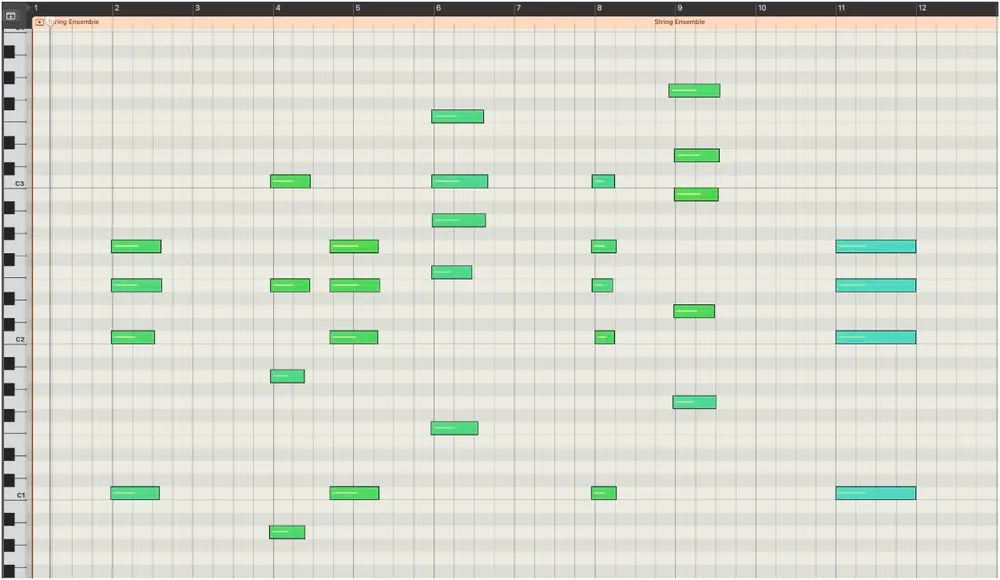
Let’s see what our MIDI looked like before:
Here’s after:
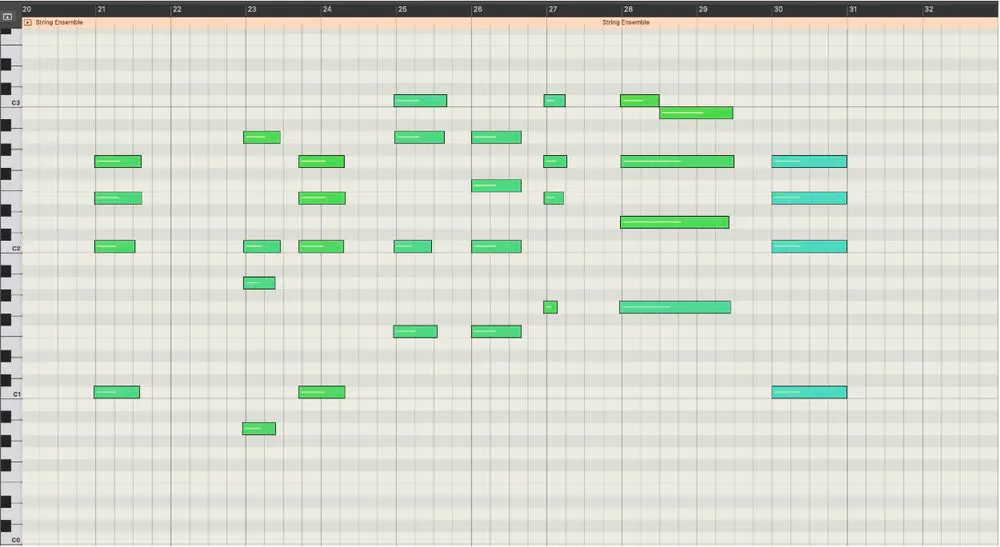
Notice how each line is much smoother and there aren’t as many awkward jumps between notes making the arrangement sound smoother.
Here’s what that sounds like:
A bit more harmonically interesting and it helps the melody cut through much better. Still flat in every other way.
Using MIDI CC
The MIDI protocol has many Control Change (CC) messages, numbered 0-127, that are used to control various parameters. Most modern sample library companies will build their plugins expecting messages with specific CC numbers to control parameters in their plugin. For instance, CC 1 is often assigned to cross-fade between samples of varying dynamics (from pppp to ffff) and CC 11 is often used to control expression (essentially volume). So by programming in (or even better, performing) adjustments in CC 1 and 11, we can add in some dynamic variation to our MIDI, immediately enhancing the “realness” of the recording.
Velocity determines how the note begins, while CC1 and CC11 can shape what happens over the course of the note. For sustained strings, that distinction is particularly important.
There are hundreds of resources on how to properly program MIDI CC for orchestral parts so I will not go in-depth on it.
Here’s how that sounds:
Choosing the Right Samples
Samplers are built by recording (or “sampling”) individual notes that can then be triggered and played back by MIDI. It means that although something is programmed with MIDI, you are triggering real audio samples, played by a real player, in a real room, through a mic. So what makes one sampler better than another? Well there are lots of factors:
- How good was the performer
- What was the tonal quality of the instrument
- What room was it recorded in
- What mic, pre-amp and audio interface was used to record it
- What mic techniques were used and how many mic positions were used
- How many articulations, techniques, FX, etc. were recorded
- How many individual samples were recorded
- How many dynamic layers were recorded
- How many times was each sample repeated for the purpose of round-robin samples (to avoid the machine-gun effect if someone triggers the same note multiple times with the same amount of velocity)
Often the answer to these questions can be dictated by the end goal of the sample library. A beat up old out-of-tune piano will probably sound most authentic in a small room, vs in a top-notch studio, whereas a pristine symphonic violin section will sound best in a large studio live room or even a concert hall. Sample library designers will keep these kinds of details in mind when they are making decisions of how they record their samples.
Some of the higher-end sample library developers include hundreds of thousands of high quality recordings captured in some of the best studios in the world. They offer detailed layers of dynamics, offer the ability to mix various mic positions together, and typically include lots of techniques, articulations, FX, and more.
Sample libraries that include this much detail tend to cost much more, but they really can elevate a recording when used correctly.
Up until this point I have been using Logic Pro’s stock string virtual instrument, Studio Strings, but now I will use some higher-end sample libraries developed by Spitfire Audio: Spitfire Chamber Strings Professional. Listen to how much life is suddenly introduced to the recording.
Separating Lines
So far I have programmed the ensemble as one instrument, but now for further detail I will separate my string programming into various parts, each part on its own track: Violin I, Violin II, Viola, Cello, and Bass
An actual group playing this part will not have perfect timing or move together perfectly through dynamic variations (although that is their goal). So for more realism, I manually play in and record each individual part, making sure to preserve (or even improve) the counterpoint I came up with earlier. I also perform in the variations of CC messages individually for each track. [Side note – it’s very important that you actually perform the note entry and CC message adjustments. Even if you are a novice at the piano, a performed part will naturally sound more human. If you need to quantize, that’s okay, just don’t quantize to 100% to avoid a “technically perfect” but robotic take.] The tiny variations in dynamics and timing between the tracks makes it sound more human.
Before this step my Session looked like this:
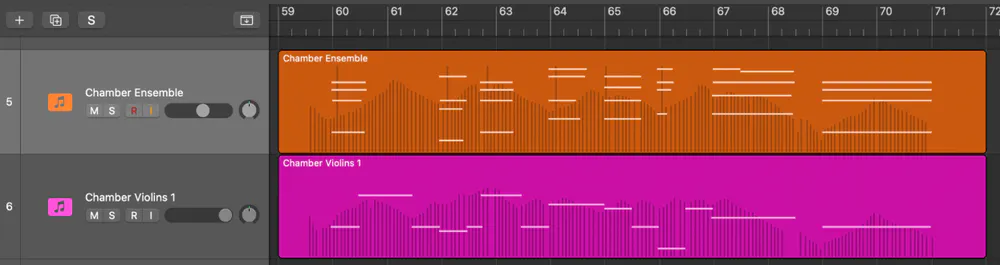
Now it looks like this:

Here’s how it sounds:
Adding Textures
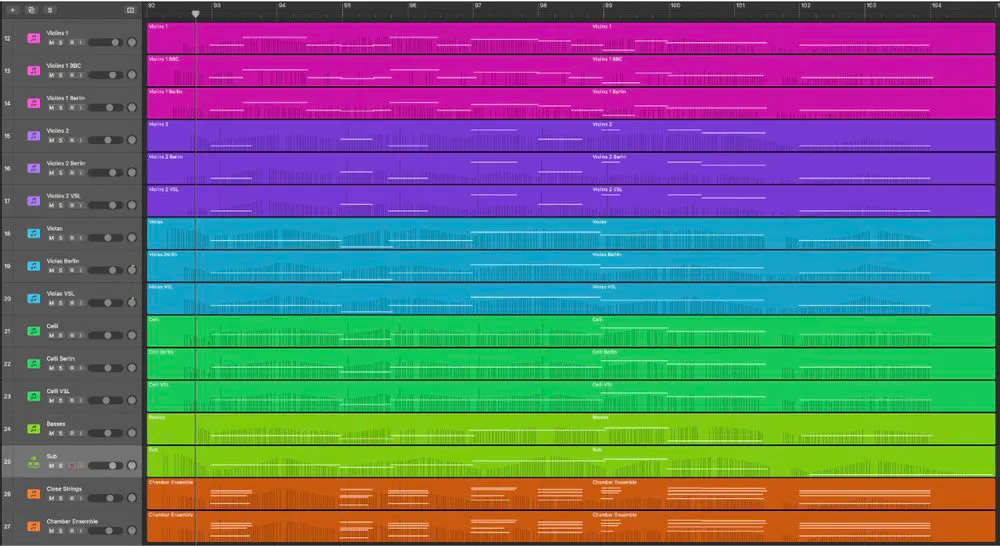
If you are following along and are already happy with the timbre of your strings you can skip this step, but I find that having each part played by multiple Sample Libraries is a great way to create more interesting and realistic sounding strings. So, I duplicated each part and used some additional Sample Libraries to help fill in the sound, namely: Orchestral Tools Berlin Orchestra: Created with Berklee, Native Instruments’ Kontakt Factory Library 2 – Orchestral Collection, and Spitfire’s BBC Symphony Orchestra Core.
I also took the earlier MIDI track I had before I separated each line into its own tracks, and had it play using Spitfire’s Originals Cinematic Frozen Strings, which to my ears adds an incredible close-miced texture.
Another subtle texture that makes a big difference is to layer in a Sine wave Sub-Bass Synth. I tend to use Xfer’s Serum 2 but any synth works for this. I made sure to play the notes in (rather than draw them) and to use MIDI CC to ride the volume up and down to match the Double Bass part.
This step adds quite a few tracks to my session, now looking something like this:
Here’s what it sounds like:
Adding Noise and Breaths
If you listen to an orchestral recording, even the best ones, you will hear noise. White electronic noise, room tone, musicians shuffling around, page turning, etc.
Adding in these sounds will often bring a new layer of realism to the recording.
I added in some concert hall and studio live room Room Tone, some breathing, and the sounds of music stands being adjusted. Here’s what that sounds like:
Layering in Real Instruments
There is nothing that will elevate your recording like having even just one live performer. I understand this is a luxury not everyone can afford when programming strings, but it is probably the one thing that makes the biggest difference.
Here are a few things that I have learned over time to help one string player sound more like a section:
- For a single melody line, have the player record everything 3 times each take with slight differences/imperfections in intonation. Take 2 should be the only one with absolutely perfect intonation. Takes 1, 2, and 3 can be mixed Left, Center, and Right respectively
- Even a small amount of real string performance can make a meaningful difference, even if the part ends up mixed quietly in the mix. Assuming the notes are within range, have the violinist play the viola part anyway. Have them play the cello part an octave or 2 up and then pitch it down in post… or anything else you can think of – there are no rules here [Note that you will lose lots of high-frequency information if you do this.]
In my case I hired 1 violinist, Myra Choo, to record some violin and viola parts for me to layer in.
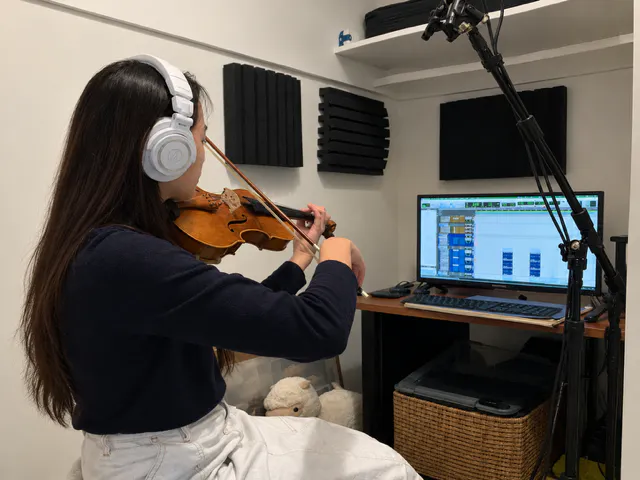
I also asked her to record the melody up an octave just in case, using the same method as before. I loved how it sounded blended in so I ended up keeping it.
So in total I had 15 audio tracks from to layer in over my MIDI:
Violin 1 – 3 takes
Violin 1 (Up an Octave) – 3 takes
Violin 2 – 3 takes
Viola (played on viola)- 3 takes
Cello (played 1 octave higher on viola) – 3 takes
Listen to how it sounds now (unmixed):
Mixing
If you’re like me, you naturally mix as you go, but spending some time after all these steps dedicated to getting the whole composition to make sense sonically can make a huge difference.
When you’re making subtle decisions about things like reverb, compression, EQ, and balance, it’s especially important to be able to trust what you’re hearing. The more nuanced the adjustments become, the more important accurate monitoring is, because you want to make decisions based on what’s actually happening in the mix rather than what your room or headphones are telling you.
Here’s what I did:
- I sent all my channels to an Aux Bus with a Large Concert Hall convolution reverb to help everything feel like it exists in the same space.
- I sent the melody to a second Aux with a Digital Reverb, giving its trail a little more length and helping it stand out.
- I added some light distortion and high-end boost to the pitched-down violins playing the cello part to compensate for some of the high frequencies lost during pitching them down.
- I added light compression to the live string parts and some of the textural layers, using just enough gain reduction to bring out detail without sacrificing too much dynamic range.
- I added a very light amount of auto-tune to the live strings to tighten them up.
- I added a very light Concert Hall with Audience Digital Reverb to the Master Bus.
- I used Mid-Side EQ to boost the high frequencies above 4kHz on the Side channels, creating a little more width.
- I pulled about 1dB from around 300Hz on the Master Bus to reduce some of the buildup I was hearing in the orchestral instruments.
- Finally, I added a Limiter to the Master to bring up the overall level.
Here’s how it sounds:
Conclusion
And just like that we went from this
to this
The end result is the outcome of dozens of subtle and detailed tweaks that stacked up make a massive difference.
Realism doesn’t come from one trick or one expensive library. It comes from introducing many small imperfections and variations that collectively recreate the behavior of real musicians in a real acoustic space.
That’s where the life comes from.


